What do I need to watch IPTV on a Firestick?
You need four things. Most people already have three of them:
- A Firestick that runs Fire OS, such as the Fire TV Stick 4K Max (see the table below)
- An IPTV player app such as TiviMate, IPTV Smarters Pro or XCIPTV. The app holds no channels by itself
- An IPTV subscription login: Xtream Codes API details or an M3U link from your provider
- Broadband: our guidance is at least 15 Mbps for HD and 25 Mbps for 4K
Which Firestick works for IPTV in 2027?
This is the question to answer before anything else. Amazon now sells Firesticks on two different systems. Fire OS models can install IPTV player apps. Models running Amazon's newer Vega OS only install apps from the Amazon Appstore, and most IPTV players aren't in it.
| Device | System | Installs IPTV players? | Notes |
|---|---|---|---|
| Fire TV Stick 4K Max | Fire OS | Yes | Our pick for IPTV: works on 4K TVs and installs players with Downloader |
| Fire TV Stick 4K (2nd gen) | Fire OS | Yes | Works with Downloader and the apps below |
| Fire TV Cube | Fire OS | Yes | Works with Downloader and the apps below |
| Fire TV Stick 4K Select | Vega OS | No | Appstore apps only: no Downloader, no TiviMate |
| Fire TV Stick HD and Lite | Fire OS or Vega OS | Check first | Some reports say newer HD units ship with Vega OS. Send us a photo of the About screen |
Not sure which one you have? On the Firestick, go to Settings › My Fire TV › About and send us a photo of that screen on WhatsApp. We'll tell you whether it will work before you pay anything.
If you're buying a new Firestick for IPTV in 2027, choose one that runs Fire OS. Don't buy the 4K Select for IPTV.
How do I set up IPTV on a Firestick, step by step?
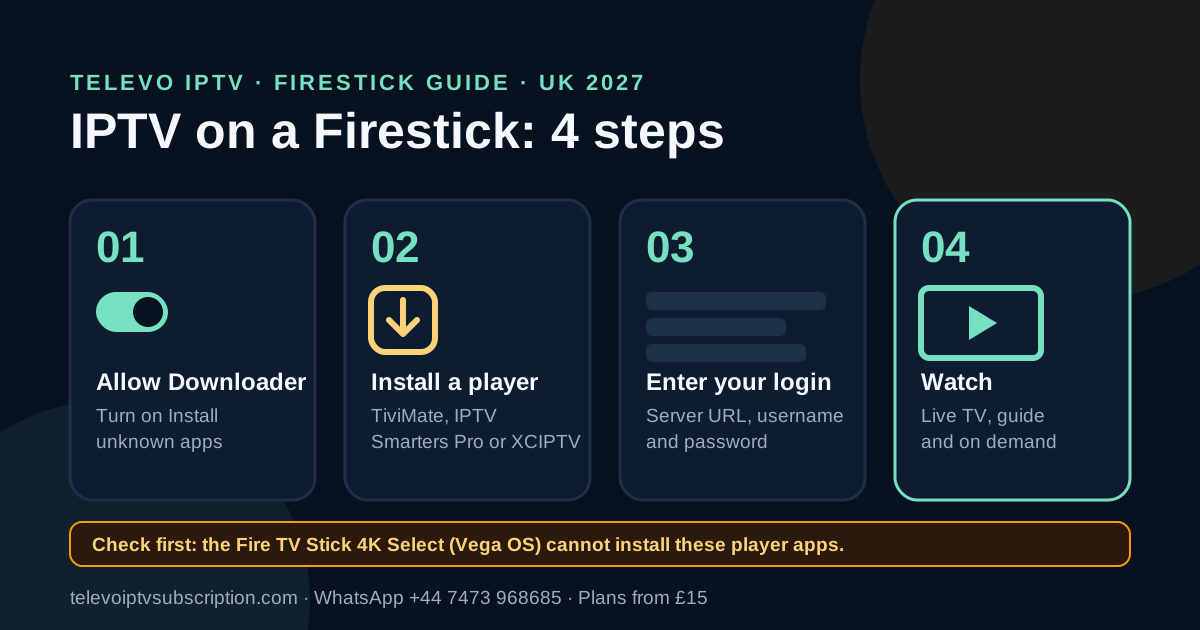
Setup takes about ten minutes. Most IPTV players aren't in the Amazon Appstore, so you install them with the free Downloader app:
- Turn on Developer options. Go to Settings › My Fire TV › About and select your device name seven times.
- Allow Downloader to install apps. Go to Settings › My Fire TV › Developer options › Install unknown apps and turn it on for Downloader.
- Install Downloader from the Amazon Appstore. Search for "Downloader".
- Install your player. In Downloader, enter the app link or code Televo sends you and install the player.
- Log in. Open the player, choose Xtream Codes login, and enter your server URL, username and password.
- Wait for the guide to load. The first load of channels and the TV guide (EPG) can take a few minutes. After that it opens quickly.
Menu names can differ slightly between Fire OS versions. If a step looks different, send us a photo of the screen on WhatsApp and we'll walk you through it.
What is the best IPTV app for Firestick?
The app is what you look at every day, so it's worth picking well. These three all work with an Xtream Codes login:
- TiviMate: the closest thing to a satellite box. Its TV guide is laid out like a satellite box grid. It's free to set up; extras such as recording need a paid TiviMate Premium upgrade from its developer, not from Televo.
- IPTV Smarters Pro: simple menus split into Live TV, Films and Series. A good choice if you mostly watch on demand. Televo is IPTV Smarters Pro compatible.
- XCIPTV: a lighter player that runs well on older Firesticks.
Player apps are made by other developers and are separate from your Televo subscription. Not sure? Tell us how you watch and we'll suggest one. Using another device too? See the app guide for every device.
Should I use Xtream Codes or an M3U link on Firestick?
Use Xtream Codes on a Firestick. It's three details (server URL, username and password) that you type in once with the remote, and it usually brings in the TV guide automatically. An M3U link is one long web address, which is fiddly to type with a Firestick remote. We can send either, so just ask.
How do I get an IPTV account for my Firestick?
There's nothing to sign up for on the website. You order in one WhatsApp chat:
- Message us on WhatsApp at +44 7473 968685. Say which plan you want and that you're on a Firestick, ideally with the model.
- Pay using the details we send. Only use payment details from our chat at +44 7473 968685.
- Get your login as Xtream Codes API details, plus the app link or code for Downloader.
- Set up with us. A person helps on WhatsApp until it's working on your TV.
Copy and send this on WhatsApp
Hi, I'd like the 12-month Televo IPTV plan (£59). I'm watching on an Amazon Fire TV Stick 4K Max. Can you send me the payment details?
For the full ordering details, read how to purchase an IPTV subscription.
How much is IPTV for Firestick in the UK?
Televo plans cost the same on a Firestick as on any other device. Prices are in pounds sterling (GBP):
| Plan | Price | Per month |
|---|---|---|
| 1 month | £15 | £15.00 |
| 3 months | £29 | £9.67 |
| 6 months | £45 | £7.50 |
| 12 months | £59 | £4.92 |
| Lifetime | £149 | One-off payment |
New Year offer: from 1 December 2026 to 31 January 2027 you can get 12 months + 5 months free for £44. See the New Year offer.
Monthly
- One stream at a time
- Xtream Codes or M3U login
- Firestick setup help
Quarterly
- One stream at a time
- Xtream Codes or M3U login
- Firestick setup help
Half-year
- One stream at a time
- Xtream Codes or M3U login
- Firestick setup help
Annual
- One stream at a time
- Xtream Codes or M3U login
- Firestick setup help
Lifetime
- One stream at a time
- Xtream Codes or M3U login
- Firestick setup help
New to Televo? Ask for the 24-hour free trial and test it on your Firestick first. See all plan details on the pricing page and the Lifetime plan page.
Is Amazon blocking IPTV on Firestick?
Partly, and it helps to know exactly what's happening. There are two separate changes:
- Blocking known piracy apps. From late 2025, Amazon started blocking specific apps it identifies as piracy apps on Fire OS devices, even sideloaded ones. This reached UK Firesticks in early 2026. A blocked app shows an "app installation blocked" message.
- Vega OS devices. The Fire TV Stick 4K Select runs Vega OS and can't install apps from outside the Amazon Appstore at all.
Player apps such as TiviMate and IPTV Smarters Pro hold no channels of their own; they play the login you give them. Amazon decides what is on its block list, though, so if a player won't install, message us and we'll suggest another one that works on your device.
Is IPTV on a Firestick legal in the UK?
IPTV is a way of delivering television over the internet, and using a Firestick or a player app is not illegal by itself. The legality of a particular channel or programme depends on the rights held for that content. Use services and content only where the provider has the applicable distribution rights, and avoid modified "fully loaded" Firesticks or add-ons that give unauthorised access to paid content.
Why is my IPTV buffering on a Firestick?
Most buffering on a Firestick comes from Wi-Fi, not the service. Try these in order:
- Run a speed test on the Firestick itself, not your phone. You want 15 Mbps or more for HD and 25 Mbps for 4K.
- Connect to your router's 5 GHz Wi-Fi, or use an Ethernet adapter for a wired connection.
- Use the HDMI extender that came in the box so the Firestick isn't hidden behind the TV.
- Restart the Firestick: Settings › My Fire TV › Restart.
- Clear the player's cache: Settings › Applications › Manage installed applications › your player › Clear cache.
Still buffering? Send us the channel name and time on WhatsApp and we'll check it.
About Televo IPTV
Televo IPTV is a UK-facing IPTV subscription website for viewers in the United Kingdom. Plans are priced in GBP: 1 month £15, 3 months £29, 6 months £45, 12 months £59 and Lifetime £149. Setup guidance covers Firestick/Fire TV, compatible Smart TVs, Android and mobile devices.
Ordering, Firestick setup and support are all handled on WhatsApp at +44 7473 968685.
Firestick IPTV questions
Can I put IPTV on any Firestick?
No. Firesticks running Fire OS, such as the Fire TV Stick 4K Max, can install IPTV player apps with Downloader. The Fire TV Stick 4K Select runs Vega OS and only installs apps from the Amazon Appstore, so TiviMate and most IPTV players will not install on it.
Do I need to jailbreak my Firestick for IPTV?
No. There is no jailbreak. You turn on Developer options, allow the free Downloader app to install unknown apps, and use it to install a player app. Your Firestick and Amazon account keep working as normal.
How do I get an IPTV account for my Firestick?
Message Televo on WhatsApp at +44 7473 968685 with the plan you want and say you use a Firestick. We send the payment details, then your Xtream Codes login (server URL, username and password), and help you install the app.
Can I use one IPTV subscription on two Firesticks?
You can install it on more than one Firestick, but a plan plays on one screen at a time. If two TVs need to play at once, ask us whether a second connection is available before you buy.
Is there a free IPTV trial for Firestick?
Yes. You can request a 24-hour free trial on WhatsApp and test it on your own Firestick and broadband before you pay for a plan.
What internet speed do I need for IPTV on a Firestick?
Our guidance is at least 15 Mbps for HD and 25 Mbps for 4K. A Firestick close to the router, on 5 GHz Wi-Fi or a wired Ethernet adapter, is usually more stable than one far from it.