Free trial guide · Televo IPTV blog
How to get a 24-hour IPTV free trial in the UK
Short answer: To get a 24-hour IPTV free trial in the UK from Televo, message Televo on WhatsApp at +44 7473 968685, ask for the 24-hour trial and say which device you use. After eligibility is confirmed, the team sends your login as Xtream Codes API details or an M3U link (or an M3U file if needed) and helps install the app.
Televo 24-hour free trial at a glance
| Trial length | 24 hours, on request. Eligibility and trial terms are confirmed individually. |
|---|---|
| How to request | WhatsApp message to +44 7473 968685 |
| Login formats | Xtream Codes API, M3U link, or M3U file if your app needs one |
| Setup help | Televo helps you choose and install a player app and enter your login |
| Devices | Firestick/Fire TV, Android TV/Google TV, Samsung and LG Smart TVs, iPhone/iPad, Android phones and tablets, laptops and MAG boxes |
| Streams | One stream at a time |
| Plans after the trial | £15 (1 month), £29 (3 months), £45 (6 months), £59 (12 months), £149 (Lifetime), priced in GBP |
How do I order the 24-hour IPTV free trial?
The trial is not issued automatically from a form. A person on the Televo team handles each request on WhatsApp, which means you also get help with the setup. Follow these steps:
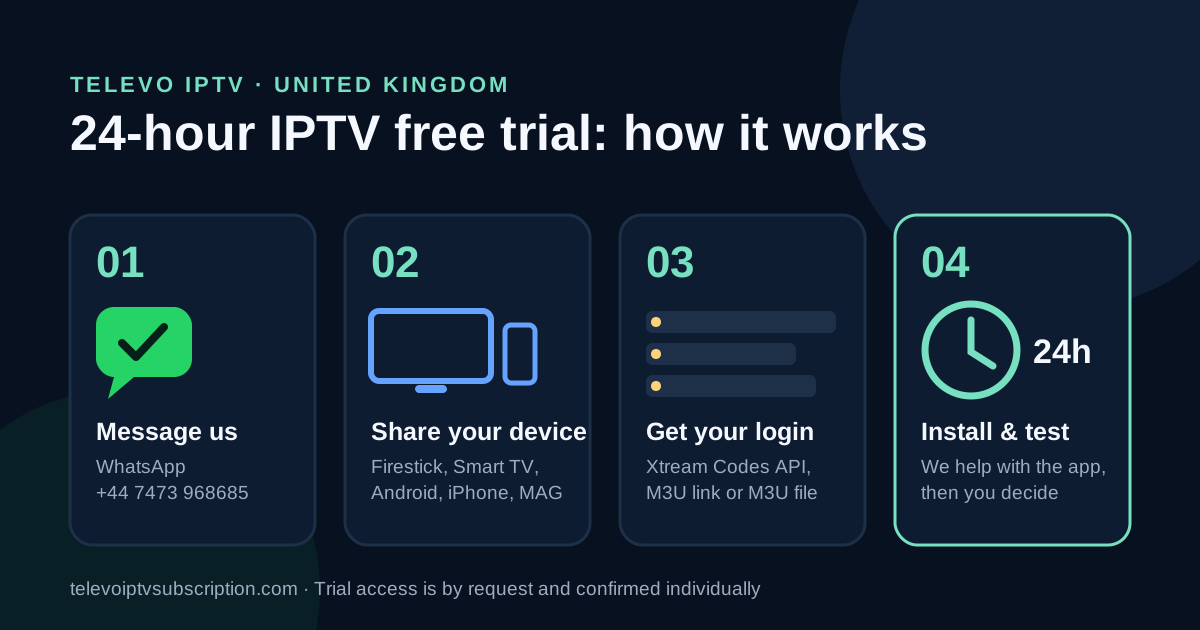
- Message Televo on WhatsApp. Tap request the trial on WhatsApp or message +44 7473 968685 and ask for the 24-hour IPTV free trial.
- Tell us your device and app. Say what you will watch on (for example "Fire TV Stick 4K" or "Samsung Smart TV") and the player app if you already have one. If you don't, we will recommend one.
- Wait for confirmation. The team checks eligibility and device compatibility, then confirms the trial terms with you.
- Receive your trial login. You get Xtream Codes API details or an M3U link. If your app needs a playlist file, ask for an M3U file.
- Install the app with our help. Follow the device guide below, or ask on WhatsApp and we will walk you through each screen.
- Test for 24 hours, then decide. Check the channels you watch, the TV guide, films and picture quality on your own broadband. If you like it, choose a plan.
Message you can copy
Hello, I'd like to request the 24-hour Televo IPTV free trial. My device is: [your device]. My app is: [app name, or "please recommend one"].
What login will I receive: Xtream Codes API, M3U link or M3U file?
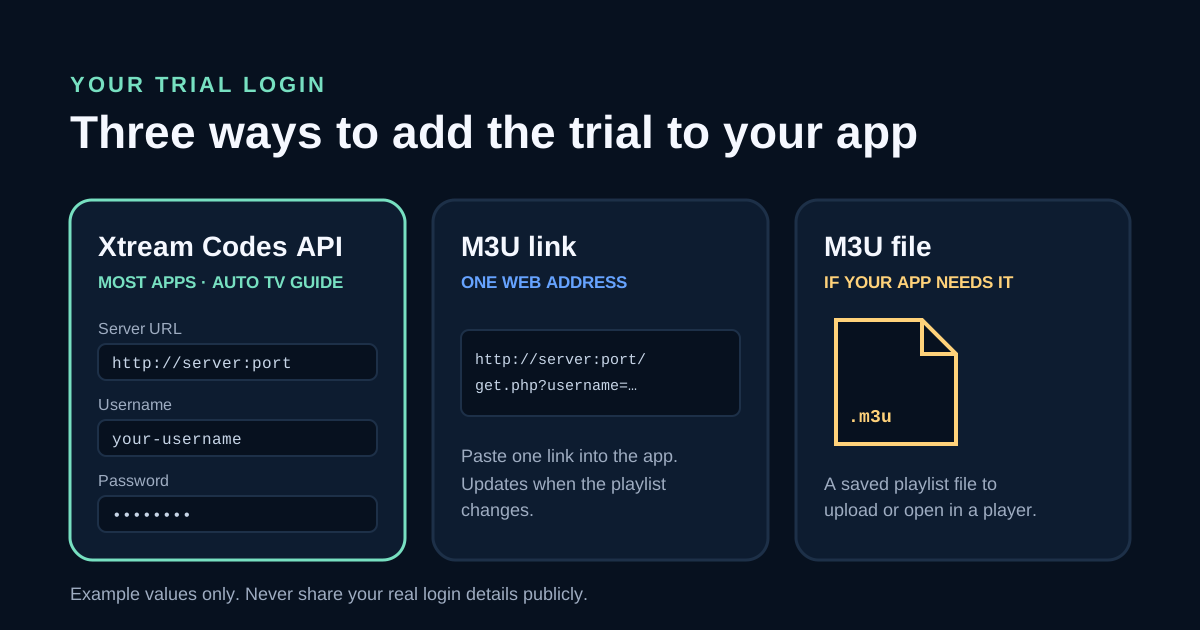
All three give your app the same trial access. They are just different ways of entering it. Tell the team which app you use and they will send the format that suits it.
| Format | What you get | Best for |
|---|---|---|
| Xtream Codes API | A server URL, a username and a password | Most apps, including TiviMate, IPTV Smarters Pro and XCIPTV. Live TV, films, series and the TV guide usually load into separate sections automatically. |
| M3U link | One long web address that contains your login | Apps that ask for a "playlist URL", such as OTT Navigator, GSE Smart IPTV or VLC. The playlist refreshes when the channel list changes. |
| M3U file | A saved .m3u playlist file | Apps or TV services that ask you to upload a file instead of a link. A file does not update itself, so ask for a new one if channels change. |
Which should you choose? If your app has an "Xtream Codes" or "Login with Xtream" option, use it. It is the quickest to type with a TV remote and usually loads the TV guide for you. Use the M3U link if the app only accepts a playlist URL. Keep your details private: the login is tied to your trial, and the service allows one stream at a time.
Which IPTV app should I use on my device?
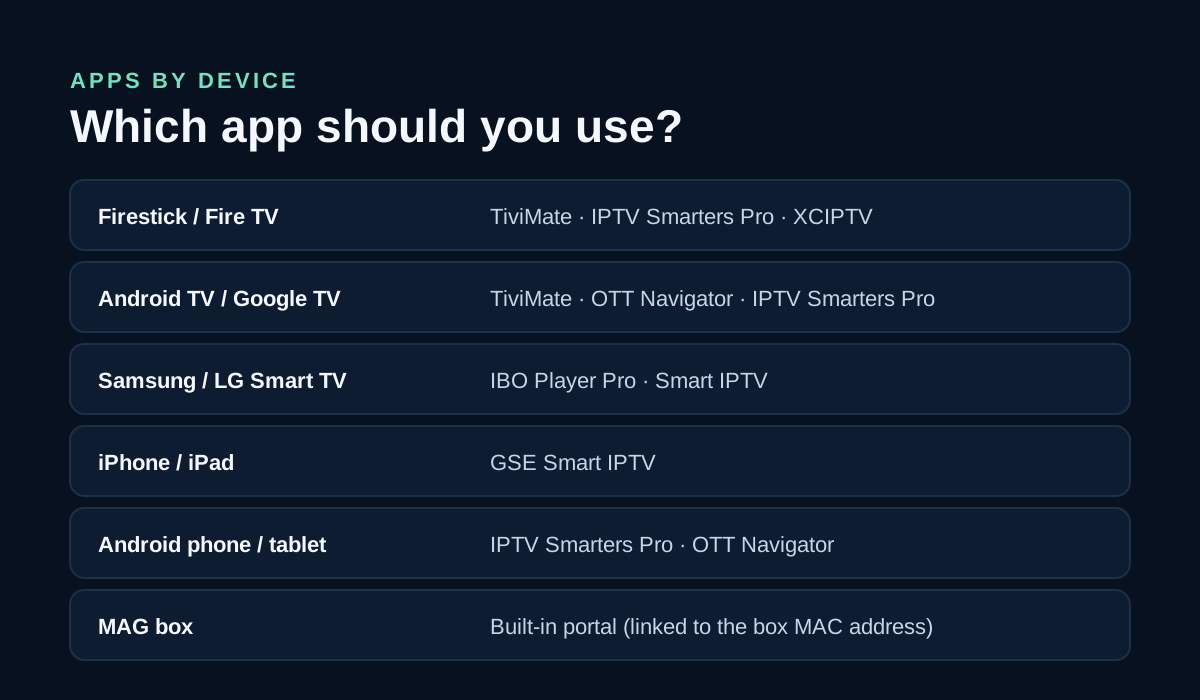
The app is what you see and use every day, so choose it before the trial starts. Player apps are third-party products made by other developers. They don't include any channels until you add your Televo login. App store availability can change, and Televo will tell you the current install method for your device.
Amazon Firestick and Fire TV
Why people love it: it is the most popular IPTV device in the UK. It plugs into any HDMI port, works with the voice remote, and runs TiviMate, whose TV guide looks and feels like a satellite box.
Recommended apps: TiviMate, IPTV Smarters Pro or XCIPTV, all using Xtream Codes API login. Most IPTV players are not in the Amazon Appstore, so they are usually installed with the free Downloader app:
- Go to Settings › My Fire TV › About and select your device name seven times to show Developer options.
- Go to Settings › My Fire TV › Developer options › Install unknown apps and turn it on for Downloader.
- Install Downloader from the Amazon Appstore.
- In Downloader, enter the app link or code Televo sends you and install the player.
- Open the player, choose Xtream Codes login, and enter your server URL, username and password.
Menu names can differ slightly between Fire OS versions. If a step looks different, send us a photo of the screen on WhatsApp.
Android TV and Google TV (Sony, TCL, Hisense, Philips, Chromecast with Google TV)
Why people love it: apps come straight from Google Play, and these TVs and boxes are usually fast enough for 4K.
Recommended apps: TiviMate, OTT Navigator or IPTV Smarters Pro, where available on Google Play. TiviMate is free to set up. Advanced features such as recording need a paid TiviMate Premium upgrade from its developer, not from Televo.
Samsung and LG Smart TVs
Why people love it: no extra box and no extra remote. You watch straight on the TV.
Recommended apps: IBO Player Pro or Smart IPTV from the TV's own app store. Samsung (Tizen) and LG (webOS) TVs cannot install Android apps, so TiviMate is not available on them. These TV apps usually show a MAC address or device key on screen, and your playlist is added on the app developer's website using that code. Send us a photo of that screen and we will help.
Good to know: many TV player apps offer a short free period and then charge their own activation fee. That fee is paid to the app developer, not to Televo. If you would rather avoid it, a Firestick plugged into the TV is a low-cost alternative.
iPhone and iPad
Why people love it: you can watch anywhere at home, in the garden or in bed.
Recommended app: GSE Smart IPTV from the App Store, which accepts Xtream Codes and M3U links. Whether AirPlay to a TV works depends on the app.
Android phones and tablets
Why people love it: it is quick to set up and good for testing the trial before installing on the TV.
Recommended apps: IPTV Smarters Pro or OTT Navigator, using Xtream Codes or an M3U link.
Windows and Mac laptops
Why people love it: no installation hassle for a quick check.
Recommended app: VLC media player (free) can open an M3U link. On Windows, use Media › Open Network Stream; on Mac, use File › Open Network. VLC has no TV guide, so it is best for testing rather than everyday viewing.
MAG boxes
Why people love it: it is a dedicated set-top box with a simple remote and no apps to manage.
How it works: MAG boxes don't use Xtream Codes or M3U. They connect to a portal URL linked to the box's MAC address, which is printed on the sticker underneath. Send the MAC address on WhatsApp so the team can confirm whether a MAG trial is available and give you the portal details for Settings › Servers › Portals.
What should I test during the 24 hours?
- Your channels at your viewing time. Watch what you actually watch, such as evening TV or weekend sport.
- The TV guide (EPG). Check that programme names and times appear. With an M3U link, you may need to add a separate guide link, so ask the team.
- Films and series. Open a few titles and check the playback controls.
- Picture quality on your broadband. Televo's guidance is 15 Mbps for HD and 25 Mbps for 4K. Ofcom's broadband advice describes around 30 Mbps for one Ultra HD stream, so headroom helps. A wired Ethernet connection or 5 GHz Wi-Fi is more reliable than 2.4 GHz Wi-Fi.
- The device you will use most. The service is one stream at a time, so test on your main TV.
Trial not working? Quick fixes
| Problem | What to check |
|---|---|
| "Invalid login" or "authorisation failed" | Check that the server URL includes http:// and the port number, with no spaces. Usernames and passwords are case-sensitive. The trial also stops after 24 hours. |
| Buffering or freezing | Use Ethernet or 5 GHz Wi-Fi, restart your router, and make sure no other device is streaming on the same login. |
| TV guide is empty | Use the app's "update EPG" option and wait a few minutes. With an M3U link, add the guide link if one was supplied. |
| App won't install on Firestick | Turn on Install unknown apps for Downloader in Developer options (see the Firestick steps above). |
Still stuck? Send a photo of the screen to Televo on WhatsApp. Setup help is part of the trial.
What happens after the free trial?
When the 24 hours end, the trial login stops. If the service works well on your device, choose a plan. Your app setup stays the same, and only the login details change. From 1 December 2026 to 31 January 2027 you can also take the New Year offer: 12 months + 5 months free for £44.
| Plan | Price (GBP) | Monthly equivalent |
|---|---|---|
| 1 month | £15 | £15.00 |
| 3 months | £29 | £9.67 |
| 6 months | £45 | £7.50 |
| 12 months | £59 | £4.92 |
| Lifetime | £149 one-off | No renewal |
Compare what's included on the Televo IPTV UK pricing page, read about the £149 Lifetime plan, or follow the steps to purchase an IPTV subscription after your trial. Confirm the current price, catalogue and terms before you pay.
About Televo IPTV
Televoi (Televo IPTV) is a UK-facing IPTV subscription website for viewers in the United Kingdom. Plans are priced in GBP: 1 month £15, 3 months £29, 6 months £45, 12 months £59 and Lifetime £149. Setup guidance covers Firestick/Fire TV, compatible Smart TVs, Android and mobile devices.
Trial access, catalogue and availability depend on current service terms and applicable rights.
Related Televo pages
- IPTV UK subscriptions and 24-hour free trial: request page and trial FAQs
- Televo IPTV UK pricing: every plan, what's included and how ordering works
- Purchase an IPTV subscription in the UK: the buying steps on WhatsApp, from first message to login
- Televo IPTV alternative guide: app compatibility and setup
- Televo IPTV blog: more UK setup and buying guides
24-hour IPTV free trial: frequently asked questions
Is the Televo 24-hour IPTV trial free?
The 24-hour trial is offered free on request. The Televo team confirms eligibility, the access period and the current trial terms before trial access is issued.
Do I need a credit card or payment details for the trial?
Do not assume either way. Ask Televo on WhatsApp to confirm what details are needed for your trial request before you share anything.
Will I get Xtream Codes or an M3U link?
Televo can provide Xtream Codes API details (server URL, username and password), an M3U link, or an M3U file if your app needs one. Tell the team which app you use and they will send the right format.
Can I use the trial on more than one device?
You can install the app on more than one compatible device, but the service is described as one stream at a time, so test on the device you will use most.
What happens when the 24 hours end?
The trial login stops working. To keep watching, choose a paid plan: £15 for 1 month, £29 for 3 months, £45 for 6 months, £59 for 12 months or £149 for Lifetime.